Firewalls
Policy and rule changes, VPN users and site-to-site tunnels, firmware planning, security subscriptions and licensing renewals tracked. FortiGate first; we also take over Cisco, Meraki, SonicWall and others.
Network Management · San Francisco & Bay Area
We manage the network your business runs on: firewalls, switches, Wi-Fi, internet links and VPNs. Monitored 24/7, backed up, patched on a plan and documented, from $695 per site per month. Network only, so it works alongside your IT team or general MSP instead of replacing them.
What Network Management Covers
“Network management” means different things to different providers. Here is exactly what is in scope with us, and what is not.
Policy and rule changes, VPN users and site-to-site tunnels, firmware planning, security subscriptions and licensing renewals tracked. FortiGate first; we also take over Cisco, Meraki, SonicWall and others.
Port and VLAN changes, PoE budget for phones, cameras and access points, uplink health, loop and error detection. Guest, staff, voice and device traffic kept apart.
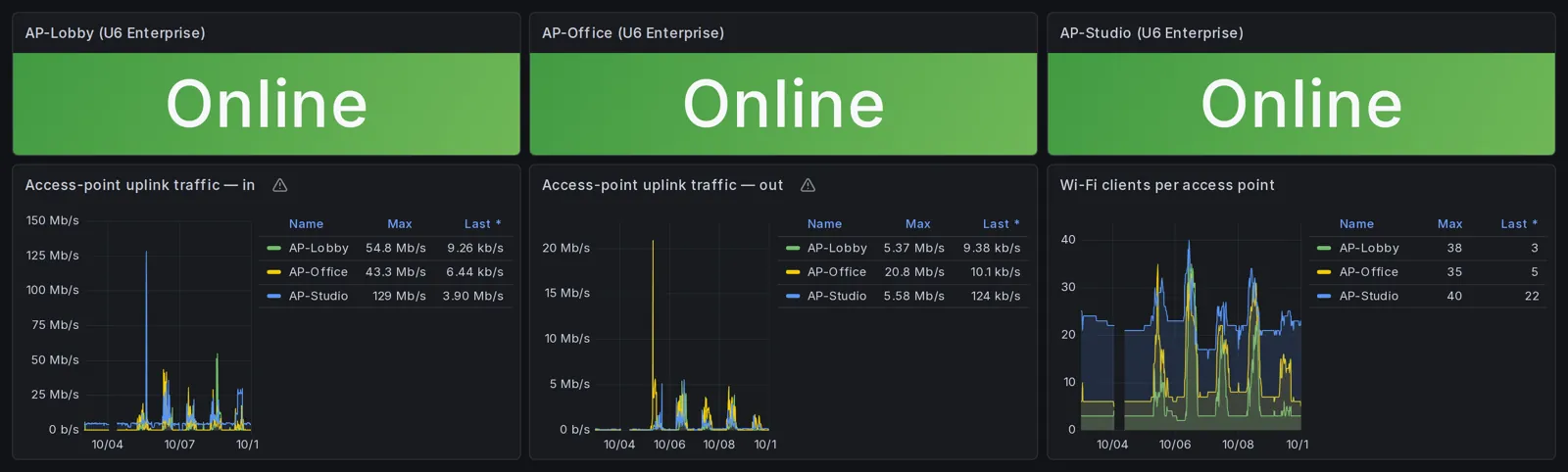
Access point health, client counts, channel and power settings, SSIDs and guest access. Coverage problems traced to a cause, not answered with another extender.
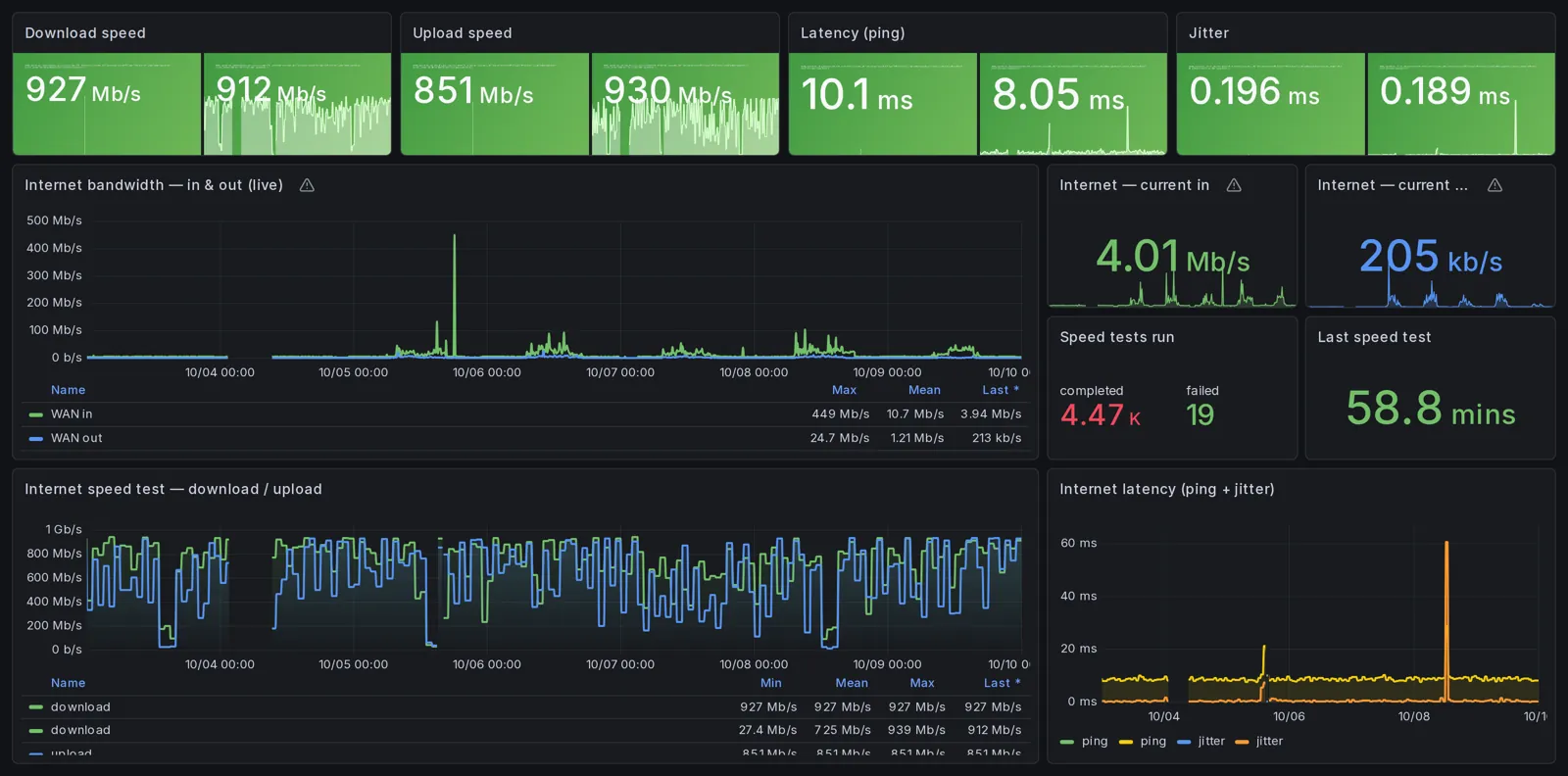
Latency, packet loss and speed tracked over time, so when the carrier is the problem you have the evidence to open the ticket. Failover between providers where you have two.
Not in scope: help desk, laptops and printers, Microsoft 365 or Google Workspace, phones and servers. If you need those, keep your IT provider for them; we handle the network underneath.
What You Get Every Month
Most providers sell “proactive management.” These are the specific things that show up for a managed site.
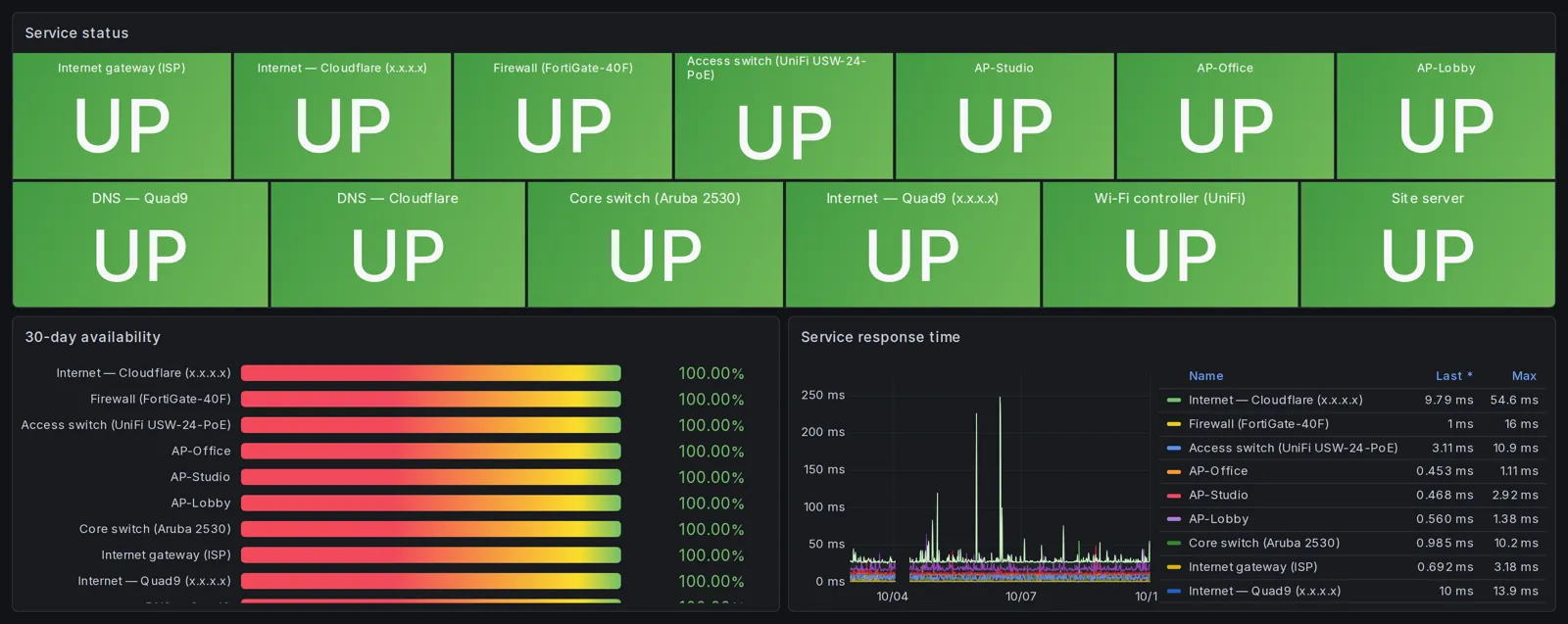
Every managed device and link watched around the clock, with alerts tuned to your normal so they mean something. Details on our network monitoring page.
Firewall and switch configs backed up automatically with every change kept, so a bad change or a dead device is a restore, not a rebuild from memory.
A maintained map of sites, devices and links, updated when the network changes. The document a new hire, auditor or insurer will ask for.
A plain-English report: uptime against target, internet performance, anything that changed, anything that needs a decision, and what we are watching next month.
Routine work: a new VLAN, a VPN user, a firewall rule, a new access point. Secure, Compliance and Multi-Site include 1, 2 or 3 hours of it a month. On Essential, changes bill at $225 an hour with a 30-minute minimum, so a small change is billed as a small change.
Updates scheduled into a maintenance window, and a heads-up well before hardware or licenses reach end of support, with list prices so you can budget.
See It
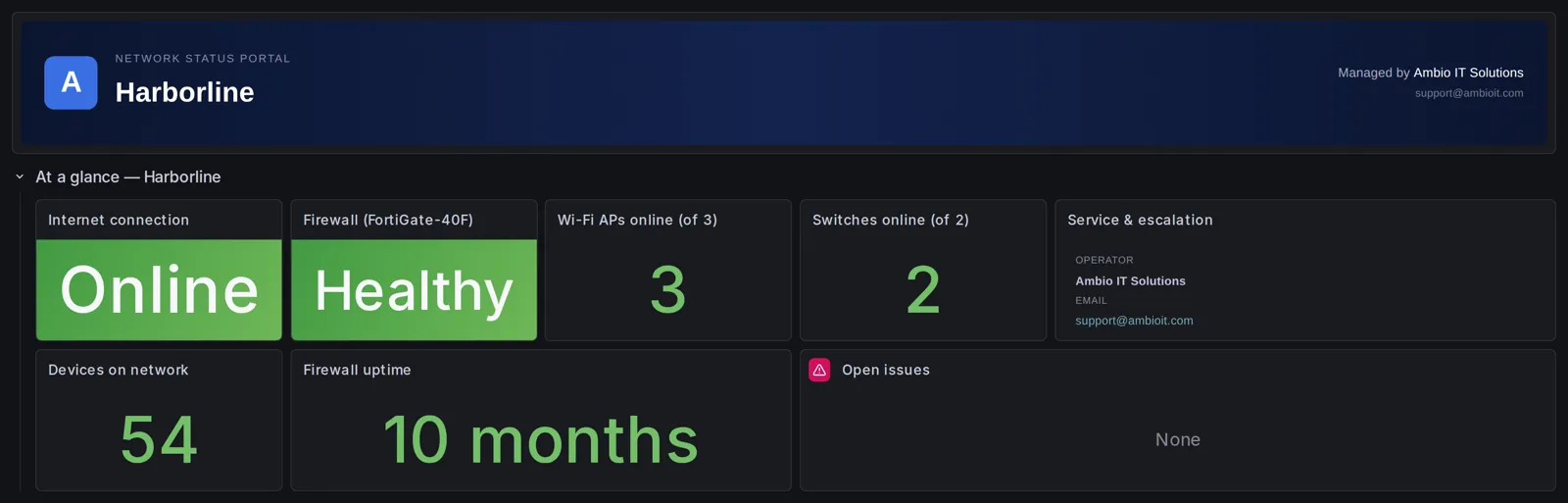
These are real screenshots from the monitoring portal of a Northern California office we manage, covering 7 days, with the client’s name changed and addresses masked. Every managed plan comes with the same portal, so a San Francisco office sees its own network the same way.
Pricing
None of the San Francisco network management providers we looked at publish a price. We do. Response windows and business hours for each plan are set out in your agreement and on the services page.
Up to 10 managed devices. No change hours included; changes bill at $225/hr with a 30-minute minimum. The fit for a single office that needs the network to just work.
Up to 20 devices, 1 hour of changes a month, faster response. For offices where the network is security-sensitive or busy.
Up to 30 devices, 2 hours of changes a month, with the evidence and reviews HIPAA, PCI and SOC 2 audits ask for.
One standard across every location, 3 change hours a month pooled across sites and named escalation. For a San Francisco HQ with Peninsula, East Bay or out-of-state sites.
Additional managed devices $25 each per month. Hardware, licenses and on-site travel are quoted separately. For how these compare with the market, see managed firewall cost.
Network Management vs Managed IT
Many San Francisco companies have an IT person or a general MSP who is great with laptops and Microsoft 365 and stretched thin on firewalls and switching. We take the network layer and coordinate with them. That model is co-managed network support.
If nobody owns the network today, we own it: design, changes, monitoring and the relationship with your ISP and hardware vendors. When you need project work instead of a retainer, our San Francisco network engineer page covers that. If your stack is Fortinet, see our Fortinet MSP in San Francisco page.
Getting Started
We recover access, inventory every device, audit the firewall and switching, and check firmware and support status. You get a written report you keep, whether or not you continue.
Anything risky gets fixed first: exposed management interfaces, missing backups, expired support, firmware with known vulnerabilities. Quoted at a fixed price before we start.
Monitoring and backups switched on, documentation and diagram built, and the network brought to a standard configuration we can manage consistently from then on.
After You Sign
This is the sequence we run for every new managed site in San Francisco. Dates assume you hand over credentials on day one; if access takes longer, the rest shifts with it.
If you started with a Network Risk Assessment, you already have the written report and a 60-minute readout of the findings. Anything urgent from it is quoted and fixed as its own project. The managed plan starts from that known state.
You give us admin credentials for the firewall, switches and access points, your ISP account and escalation contacts, any existing diagrams, and the names of who can approve changes. We agree the alert channel (Slack or Teams) and the maintenance window.
A small monitoring appliance goes in at your site and connects back to our stack. Every managed device is discovered and polled, alert thresholds are set for your plan, and firewall configuration snapshots start on an hourly schedule. We trigger a harmless test change to prove a backup actually captured it.
Your status portal goes live at your own address on ambioedge.com, locked to the email addresses you name. We sign in as you from a clean browser to confirm it works before we tell you it does.
Every device in scope is recorded with model, serial, firmware version and support status. Anything we cannot see gets found or declared out of scope in writing. The first network diagram is drawn from that inventory and shared with you.
A kickoff email with how to reach us, a short PDF explaining what each panel in your portal means, and an optional 15-minute screen-share. We also ask for a second contact at your company so one person being out of office is not a single point of failure.
We look back at anything that surprised either side in the first month and fix it: a device that was missed, an alert that fires too often, a contact who should be on the list.
Delivered on the first business day of the following month: uptime, internet performance, what changed, what needs a decision. It arrives every month after that. Between summaries, we contact you when something needs attention or a decision.
Monitoring runs 24/7 from the day it is switched on. Human response during onboarding and after follows the plan’s business-hours window in your agreement.
Where We Work
Day-to-day network management is remote, which is how it is done well. On-site visits are scheduled for onboarding, hardware swaps, cabling and Wi-Fi surveys, and anything that needs hands on the equipment. We work with offices across San Francisco, including the Financial District, SoMa, Mission Bay, Dogpatch, the Mission and the Presidio, and across the Peninsula, East Bay and South Bay. Sacramento-area offices are covered from our Sacramento base; see Sacramento MSP.
Who Runs Your Network
Jeff Johnson runs Ambio Edge Networks and does the engineering. There is no account manager between you and the person who changes your firewall.
Jeff's career has been firewalls, switching, Wi-Fi and WAN and nothing else: architecture, security and operations, including networks at Fortune 500 scale. Cisco certified, Fortinet certified, CompTIA certified.
The engineer who did your assessment is the engineer who onboards you, is the primary engineer for your alerts, your changes and writes your monthly summary. No tiers, no ticket hand-offs, no re-explaining the problem to a second person.
A one-engineer firm means the context never leaves. The trade-off is coverage, and the agreement is honest about it: planned time off is announced in your channel at least 24 hours ahead, and during holidays, illness or travel response targets become best effort unless a backup engineer has been named for that period. For business-hours response we may use a qualified backup engineer, if one is under contract, bound by the same confidentiality and your site rules.
Every production change is recorded with what, why, when and how to roll it back. Your configurations and diagram are version-controlled, credentials are stored in a vault, and you always keep your own admin access. If you ever change providers, your next engineer would start from current documentation and change history, not a blank page.
If You Leave
Switching network providers is painful when the old one held the only copy of everything. Our agreement is written so that cannot happen.
You retain administrative access to your firewall, switches and access points for the whole engagement. We hold our own separate credentials so we can work, but we never hold the only key.
When the agreement ends we return your documentation and credentials within 30 days and remove our access. The network diagram, the device inventory and the written record of changes are yours.
Backups are kept in version-controlled storage with change history while we manage the site. Within 30 days of the end of the agreement you get the configuration backup and change history along with the documentation and credentials, so the next provider starts from a known configuration rather than a running device.
If you bought a Network Risk Assessment first, the report and roadmap are yours on payment, whether or not you ever signed a managed plan.
Equipment is yours unless a project statement of work says otherwise. The only exception is transitional hardware we lend during a migration, which stays ours and goes back when the project ends.
Credentials, configurations, diagrams, logs and business information are confidential both ways. Your data is held only in systems we control; nothing stays on a subcontractor’s systems after an engagement closes.
Term: you can give notice in the first 90 days and leave 30 days later without an early-termination fee; onboarding fees are non-refundable. After that, managed plans run an initial 12-month term and renew for 12 months at a time unless either side gives 60 days’ written notice before the term ends. After the initial term, either side can end the agreement on 60 days’ written notice. Any project in flight finishes or stops at a documented point, your choice, and is billed to that point.
FAQ
Managed IT covers people and endpoints: help desk, laptops, Microsoft 365, passwords. Network management covers the infrastructure everything else rides on: the firewall, switches, Wi-Fi, internet links and VPNs. We only do the network. If you already have an IT provider or an internal IT person, we take the network layer off their plate and work alongside them.
Yes. We standardize new builds on Fortinet, but we take over what you already have: Cisco, Meraki, Aruba, Ubiquiti UniFi, SonicWall and others. The assessment tells you what is worth keeping, what is end of life, and what a migration would cost if one makes sense.
Monitoring and alerting run 24/7 on every plan. Human response is business hours, at the service level in your agreement. Outside business hours, emergency work is available at hourly emergency rates when an authorized contact asks. Response means a senior engineer investigating and starting mitigation, not a ticket number.
That is the most common starting point: an inherited network, a previous provider who left, or an office you moved into with equipment already on the wall. The first step is a Network Risk Assessment: we recover access, inventory and audit the gear, and give you a written report you keep. Onboarding to monthly management is quoted at a fixed price after that.
Monthly management plans run on a written agreement with a 12-month term. You can give notice in the first 90 days and leave 30 days later without an early-termination fee; onboarding fees are non-refundable. The assessment is a one-time fixed fee with no obligation to continue.
No. We manage networks across the Bay Area and California, and remotely nationwide for multi-site organizations. San Francisco, the Peninsula, the East Bay and the South Bay are within our on-site footprint, and Sacramento is home base.
Monitoring and alerting keep running 24/7 regardless. Planned time off is announced in your alert channel at least 24 hours ahead with what coverage applies. During holidays, planned time off, illness or travel, response targets become commercially reasonable best effort, unless a backup engineer has been named for that period. For business-hours response we may use a qualified backup engineer, if one is under contract, bound by confidentiality and your site rules. Whatever happens, you keep your own admin access to the network, and the documentation stays current.
A managed device is a firewall, switch, access point, or a server we monitor for reachability only; we do not administer servers, laptops or user accounts. Each plan includes a set number per site and extra devices are $25 per month each. From you we need admin credentials for those devices, your ISP account and escalation contacts, any diagrams you have, and the names of who may approve changes and request emergency work. You also keep your ISP service, vendor support contracts and firewall security licensing current; those are not something we can carry for you.
Routine requests inside your included hours, such as a VLAN, a VPN user or a firewall rule, are scheduled during business hours once an authorized contact approves them. Firmware updates and anything that could interrupt service go into the maintenance window, which defaults to Friday 6 p.m. to Sunday 6 p.m. Pacific and can be moved with notice. Emergency changes outside the window happen only when the alternative is an outage, and you are told the same day. Every production change is documented with what was done, why, when, and how to roll it back.

Start Here
Tell us about your office: how many people, what equipment, and what is giving you trouble. A senior engineer replies, not a salesperson.