Network Management · Sacramento Region

Network management for Sacramento businesses,
run by a senior engineer.

Your firewall, switches, Wi-Fi, internet circuits and VPNs, looked after by one senior engineer who lives in the region. Plans start at $695 per site per month and cover the network layer only, so your existing IT provider keeps the laptops and email and stops getting blamed for the Wi-Fi.

Scope

Four layers. Nothing above them.

We draw a hard line at the network. Below is what we own on a managed site, and at the bottom, what we leave to your IT provider.

Edge

Firewall

Rules, NAT, user VPN and site-to-site tunnels, firmware kept on a schedule, security licenses renewed before they lapse instead of after. New builds go on FortiGate; existing Cisco, Meraki, Aruba, UniFi and SonicWall gear is taken over as-is.

Core & access

Switching

VLAN design, port assignments, PoE for phones, cameras and access points, trunk and uplink health, error and loop detection. Guests never share a segment with your file server.

Air

Wi-Fi

AP uptime, client load, channel plans, SSID and guest-portal changes. A warehouse dead zone or a conference room that drops calls gets diagnosed, not papered over with a consumer mesh kit.

Circuits

ISP links & failover

The Sacramento region is a patchwork: fiber on one block, cable or fixed wireless on the next. We measure each circuit continuously, so a slow carrier is argued with data, and we design failover where a second provider is available.

Outside our scope: help desk, workstations, printers, Microsoft 365, Google Workspace, phone systems and servers. Those stay with whoever handles them today. Our job starts at the wall jack and ends at the ISP handoff.

Monthly Deliverables

Six things you can check we actually did.

“Proactive” is not a deliverable. These are.

Monitoring and alerting, around the clock

Every firewall, switch, access point and circuit is polled continuously, with thresholds tuned to your site so an alert means something is wrong, not that it is Monday morning. How it works is on the network monitoring page.

Config backups you can roll back to

Each device configuration is captured on every change and kept with full history. A failed firewall is a restore onto replacement hardware, not a weekend of guesswork.

A diagram that matches reality

Sites, devices, VLANs and circuits drawn and kept up to date as changes land. When your cyber-insurance questionnaire or a new accountant asks for it, you send a file instead of a shrug.

Health summary every month

Short, written in English: uptime, circuit performance, what changed, what is wearing out, and what we recommend you decide on before next month.

Change hours, stated up front

The everyday requests: a new VLAN for the badge readers, a VPN account for a new hire, a firewall rule for the accounting system. Secure, Compliance and Multi-Site include 1, 2 or 3 hours of that work a month. Essential includes none; changes bill at $225 an hour with a 30-minute minimum, not a full hour.

Firmware and lifecycle planning

Patches land in an agreed maintenance window. Hardware and license end-of-support dates are tracked and flagged early, with replacement pricing, so a dead firewall is never a surprise purchase order.

The Portal

This is the view you get as a managed client.

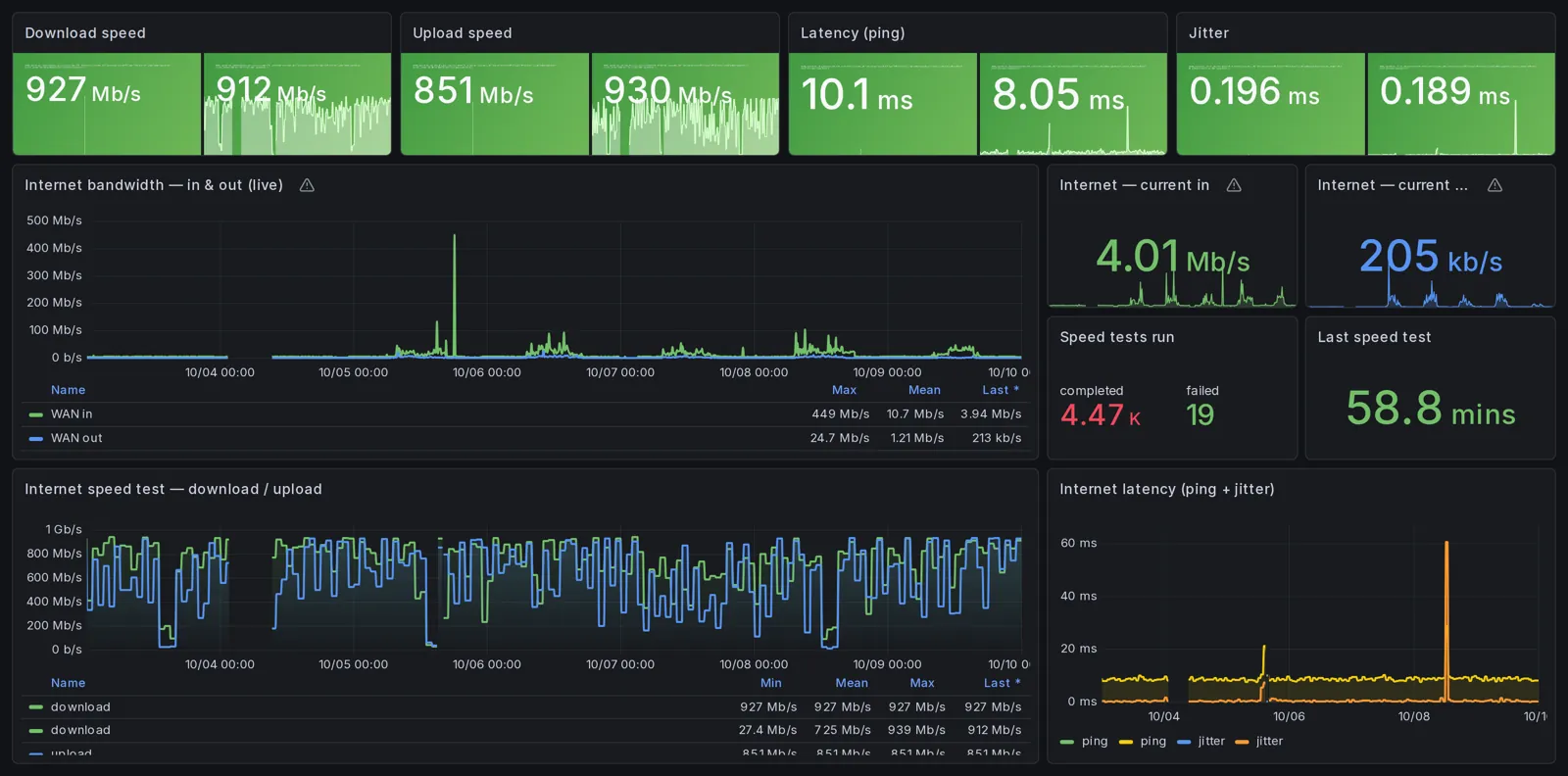
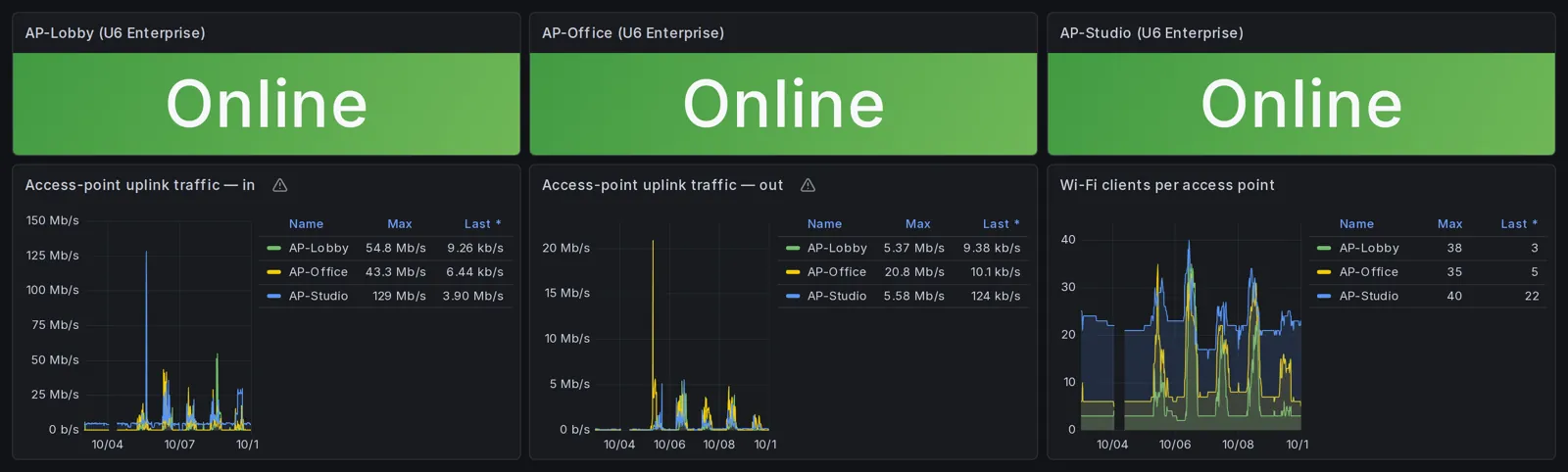
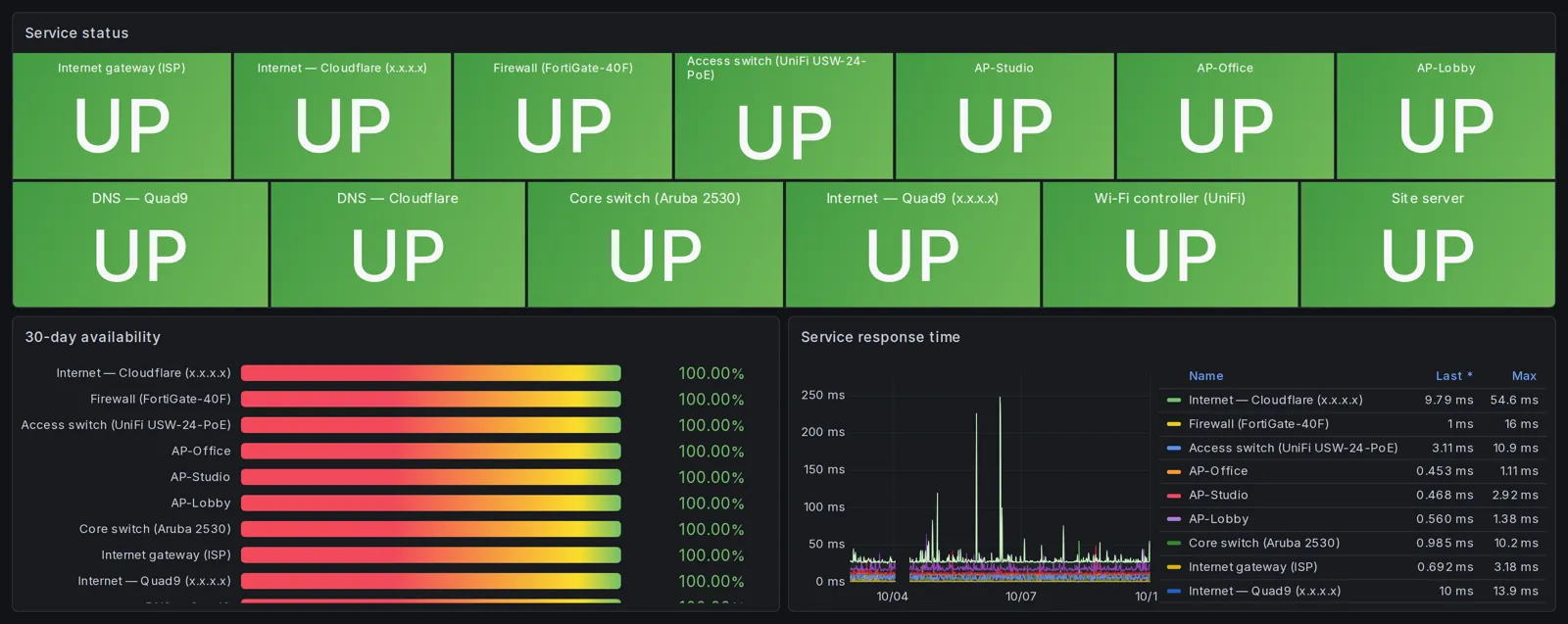
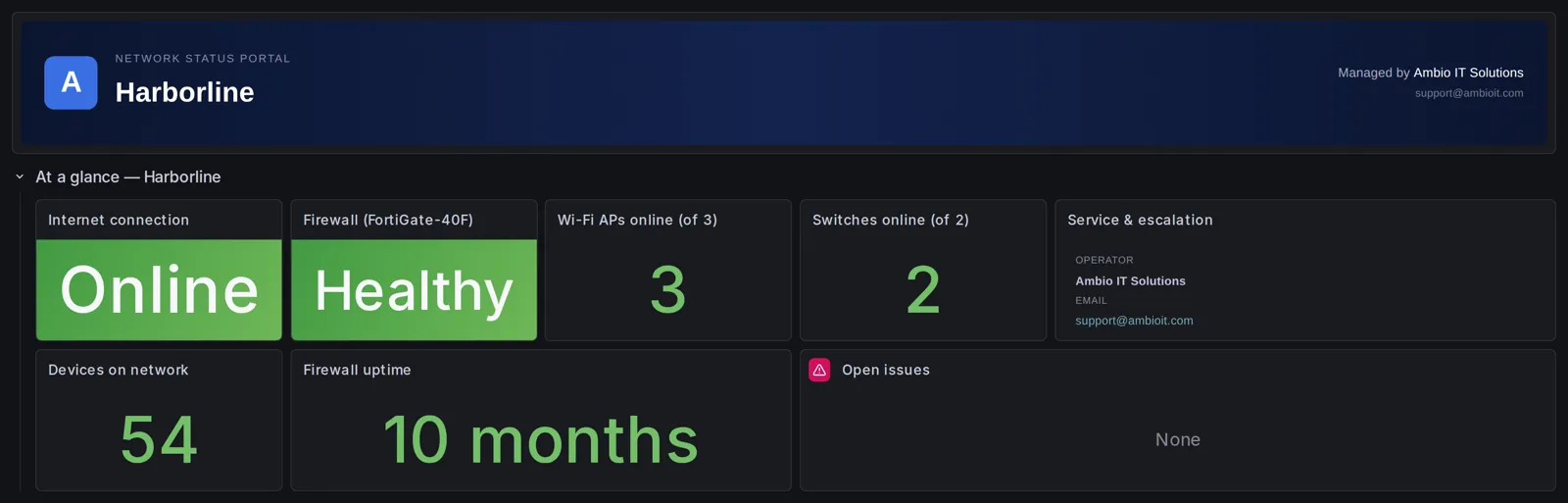
These are real screenshots from the monitoring portal of a Northern California office we manage, covering 7 days, with the client name changed and addresses masked. Nothing here is a mock-up; it is the portal managed clients log into.

Network status portal overview showing internet online, firewall healthy, 3 Wi-Fi access points and 2 switches online, 54 devices and 10 months firewall uptime
Overview: one row tells you whether the internet, firewall, access points and switches are up, how many devices are connected, and how long the firewall has run without a reboot.
Internet panels with 927 Mb/s download, 851 Mb/s upload, 10 ms latency, live bandwidth and a week of speed test history
Circuit: scheduled speed tests, live throughput, latency and jitter for the week. This is the chart you attach to the carrier ticket when they say nothing is wrong on their end.
Three Wi-Fi access points online with uplink traffic and client counts per access point over 7 days
Wireless: per-AP uplink traffic and client counts, so an overloaded access point or a room nobody can connect from is visible before anyone complains.
Service status grid showing all monitored devices up, 30-day availability at 100 percent and service response time chart
Uptime: a status grid for every monitored device and path, 30-day availability percentages, and response-time history. Your monthly summary is built from this.
Firewall CPU, memory and active connection charts over 7 days
Firewall load: CPU, memory and session counts over seven days. A firewall running hot in July is a capacity conversation, not an outage waiting to happen.

Pricing

Flat monthly rates, listed in public.

Every plan is priced per site. Business hours and response windows are defined in your agreement, and the services page lays out what each tier includes in full.

Edge Essential

$695 / site / month

Up to 10 managed devices. No change hours included; changes bill at $225/hr with a 30-minute minimum. Built for a single clinic, law office or shop that wants the network handled and nothing more.

Edge Secure

$1,295 / site / month

Up to 20 devices and 1 hour of changes a month. Suited to busier sites, or ones where the firewall policy matters as much as the uptime.

Edge Compliance

$1,795 / site / month

Up to 30 devices, 2 hours of changes a month, plus the reviews and evidence packages that HIPAA, PCI and SOC 2 auditors expect to see.

Edge Multi-Site

$2,495 first site + $995 each additional

A Sacramento headquarters with branches in Roseville, Folsom, Elk Grove, Davis or Stockton, run as one network with 3 change hours a month pooled across sites and a named escalation contact.

Devices beyond the plan limit are $25 per month each. Hardware, licenses and on-site travel are quoted on their own. Our managed firewall cost page explains where these numbers sit against the market.

Built For The Valley

Heat, shutoffs and uneven internet are design inputs here.

Summer heat and PG&E shutoffs

Network closets in the Central Valley get hot, and Public Safety Power Shutoffs can take a site offline. We advise on UPS runtime for a clean shutdown, watch device temperatures where the hardware reports them, and plan ISP failover so a branch on generator power still reaches the office.

Mixed carrier options

Fiber is available in parts of Downtown, Midtown and Roseville and patchy a few miles away, where cable or fixed wireless is the only choice. Managing that mix means knowing what each circuit actually delivers, week by week, instead of trusting the sales sheet.

The businesses we fit

This is built for businesses like outpatient clinics, law and accounting firms, food processors and ag operations, distribution warehouses along I-5 and I-80, construction offices and nonprofits: organizations big enough to need a real network and too small to staff a network engineer.

Who else is in the picture

Already have an IT provider? Good. We take the firewall and switching off their list and coordinate directly with them; that arrangement is co-managed network support. No one owning the network today? Then we own it, ISP and vendor relationships included.

How Onboarding Works

Assess, fix, then manage.

Step 1

Network Risk Assessment

We regain admin access to every device, build the inventory, audit the firewall and switch configuration, check firmware and support status, and hand you a written report. The report is yours whether you hire us or not.

Step 2

Urgent remediation

Management interfaces open to the internet, no backups, lapsed support, firmware with published exploits: these get closed first, at a fixed price agreed up front.

Step 3

Onboarding

Monitoring and backups go live, the diagram and documentation get written, and the configuration is brought to a baseline we can maintain the same way every month.

Need project work rather than a monthly plan? The Sacramento network engineer page covers one-off design and migration work. Running Fortinet already? Start with our Sacramento MSP for Fortinet networks page.

Signature To Steady State

What the first month actually looks like.

The same checklist runs for a dental office in Roseville and a warehouse off I-5. The clock starts when we have working admin credentials; everything below moves with that date.

Day 0

Readout of the assessment

If you started with the Network Risk Assessment, by signing day you have the written findings, a remediation roadmap with cost ranges, and a one-hour readout already behind you. Urgent fixes are their own fixed-price job; the managed plan starts from the documented state.

Day 1

Credentials and the contact sheet

Admin logins for the firewall, switches and APs, the ISP account number and who to call there, whatever diagrams exist, and a short list of people allowed to approve changes or call in an emergency. We also pick the Slack or Teams channel alerts will land in.

Days 2 to 5

Appliance in, polling on, snapshots running

A small monitoring box is placed at the site and connected back to our platform. Each device is found and polled, thresholds are set for your plan tier, and firewall configuration snapshots begin on an hourly cycle. We make a throwaway change and confirm the snapshot caught it before calling backups live.

Days 2 to 5

Portal check from the outside

Your status page is published on its own ambioedge.com address, restricted to the email addresses you name. We log in as you, from a browser with nothing cached, and confirm the dashboard loads before the URL goes in any email.

Days 6 to 10

Inventory and the first map

Model, serial, firmware and support status for every piece of gear in scope, confirmed on site or through the connector. Unknown devices get identified or formally excluded. The network diagram is generated from that inventory and sent to you.

Days 10 to 15

Welcome, walkthrough, window

You get a kickoff email, a PDF that explains each panel of your portal, and an offer of a quick screen-share. The first maintenance window is booked, and we ask you to name a second contact so a sick day on your side does not stall an incident.

Day 30

Retrospective

A short look at the first month: alerts that were noisy, a switch that got missed, a contact who should have been on the list. Fixed, logged, done.

First business day of month 2

Monthly summary number one

Covers your first full month: uptime, circuit performance, changes made, what is wearing out, and what to decide on. The same report lands on the first business day of every month after.

Automated monitoring is live from the day the appliance is installed. How quickly a person responds to an alert is set by the plan’s business-hours window in your agreement, not by this page.

Service Area

Based here. On site is a short drive, not a flight.

Routine management is done remotely, and that is the right way to do it. When a switch needs replacing, cabling needs tracing or a Wi-Fi survey needs walking, we show up: Sacramento proper, including Downtown, Midtown and Natomas, plus Roseville, Rocklin, Folsom, El Dorado Hills, Rancho Cordova, Elk Grove, West Sacramento and Davis. Bay Area offices are served through our network management in San Francisco page.

The Engineer

Your network is run by Jeff Johnson. Not a team named after the founder.

Ambio Edge Networks is a one-engineer firm based in the Sacramento region. Jeff does the assessments, the onboarding, the changes and the monthly summaries.

Experience

Senior network engineer, 20+ years

Two decades spent only on networks: design, security and day-to-day operations, including engagements at Fortune 500 scale. Certifications: Cisco certified, Fortinet certified, CompTIA certified.

Working together

Direct line, no dispatch desk

You talk to the person whose hands are on your firewall. The same engineer sees the alert, starts the mitigation, records the change and explains it in the monthly report. Nothing gets lost between a level-one agent and whoever eventually calls you back.

Coverage

What a solo shop means for you, stated plainly

Upside: the knowledge of your site never walks out the door with a departing technician. Downside: one person cannot be awake every hour. The agreement handles that honestly. Monitoring and alerting are automated around the clock. Planned absences are posted in your channel at least 24 hours ahead. During holidays, illness, travel or announced time off, response targets drop to best effort unless a backup engineer has been named for that period. For business-hours response we may use a qualified backup engineer, if one is under contract, bound by confidentiality and your site rules.

Nearby

Local, and documented for the day the engineer is not

Based in the Sacramento region, so a hardware swap in Folsom or Elk Grove is a drive rather than a dispatch. Every change is written up with the reason and the rollback, configurations are version-controlled, credentials are stored in a vault, and you always keep your own admin access. A qualified network engineer would have current records to start from.

Exit Terms

Leaving should not cost you your network.

Plenty of Sacramento businesses have inherited a firewall nobody has the password to because the last provider walked off with it. Here is what the agreement says happens instead.

Admin access never leaves your hands

From day one you keep your own administrative logins to every managed device. We use separate credentials of our own, so there is no single password that only we know.

Documents and credentials come back within 30 days

At termination we hand back your documentation and credentials inside 30 days and remove our own access. That includes the current diagram, the device inventory and the change history we kept for you.

Backup history

While we manage the site, device configurations live in version-controlled storage with every change kept. Within 30 days of the end of the agreement that archive goes to you or your next provider together with the documentation and credentials, as the agreement states; it is more useful than a config export taken on the last day.

Assessment findings

The Network Risk Assessment report and roadmap belong to you once paid for. Hiring us for the monthly plan was never a condition of keeping it.

The equipment

Firewalls, switches and access points are client-owned unless a specific project statement of work says different. Loaner gear we bring in temporarily during a migration remains ours and is collected when the project closes.

Confidentiality cuts both ways

Passwords, configurations, diagrams, logs and business details are treated as confidential by both parties. We hold your data only on systems under our control, and no copy remains on a subcontractor’s systems once an engagement ends.

Contract length: you can give notice in the first 90 days and leave 30 days later without an early-termination fee; onboarding fees are non-refundable. Otherwise the initial term is 12 months. It renews for a further 12 months unless one side gives written notice at least 60 days before the term is up; once the initial term has passed, either side may end it with 60 days’ written notice. Project work already underway either finishes or stops at a documented point, your call, and is billed to that point.

FAQ

Questions Sacramento business owners ask us.

We already pay an IT company. Why would we add you?

Because most general IT providers are built around help desk and Microsoft 365, and the firewall gets attention only when it breaks. You keep them for users and devices; we take the network layer underneath and work with them directly. You get a specialist on the part of your IT that everything else depends on, without replacing anyone.

What happens to our network during a PG&E shutoff or a heat wave?

We plan for both. we advise on UPS capacity so equipment shuts down cleanly rather than crashing, device temperatures are monitored where the hardware reports them, so a cooking closet is flagged before hardware fails, and where a second ISP exists we configure failover so a site on backup power stays reachable. When the power returns, we verify every device came back and the configs are intact.

Our gear is Cisco and Ubiquiti, not Fortinet. Is that a problem?

No. Fortinet is our default for new equipment, but we manage Cisco, Meraki, Aruba, UniFi and SonicWall networks as they stand. The assessment report tells you which of it is fine, which is end of life, and what replacing any of it would cost, so you decide on a schedule rather than being pushed into a rip-and-replace.

Who answers when the internet goes down at 2 a.m.?

Monitoring and alerting run 24/7 on every plan, so the outage is logged and we see it. Human response is business hours, at the service level in your agreement. Outside business hours, emergency work is available at hourly emergency rates when an authorized contact asks. Whoever responds is a senior engineer, not a call center.

How long are we locked in?

Monthly plans run on a written 12-month agreement. The Network Risk Assessment that comes first is a one-time fee with no obligation to continue, and you keep the report either way.

Are you actually local, or a remote shop with a Sacramento landing page?

Local. The engineer who manages your network is based in the Sacramento region, and on-site visits to Roseville, Folsom, Elk Grove, Davis or anywhere in between are a drive, not a travel quote. Remote management is still how the day-to-day gets done, because that is what works, but when hands are needed on the hardware, they are nearby.

You are one person. What happens when you take a week off?

The monitoring does not take the week off; alerts still reach your channel and ours 24/7. Before any planned absence we post a notice in your alert channel at least 24 hours ahead saying what coverage applies. Under the agreement, response targets during holidays, announced time off, illness or travel become commercially reasonable best effort, unless a backup engineer has been named for that period. Business-hours response can also be handled by a qualified backup engineer, if one is under contract, who is bound by confidentiality and your site rules. You keep your own admin access and the documentation stays current, so nothing waits on us for access.

Do you replace our IT company, or work next to them?

Next to them. Help desk, workstations, printers, Microsoft 365, phones and servers are excluded from our scope and stay with whoever handles them now. We take the firewall, switching, Wi-Fi and circuits, and with your authorization, we coordinate with your IT provider directly rather than through you. If nobody currently owns the network, we fill that seat, including the calls to your ISP and hardware vendors once you authorize us with them. Either way we do not administer servers, endpoints or user accounts.

What do you need from us before monitoring can start?

Four things: admin credentials for each firewall, switch and access point in scope; your ISP account details and escalation contacts; any existing diagrams, even rough ones; and the names of the people who can approve changes, request emergency work and receive invoices. Once we have those, the monitoring appliance goes in, devices are discovered and config snapshots start. You also keep your internet service, vendor support contracts and firewall security licensing active during the agreement; incidents caused by end-of-life, unsupported or unlicensed equipment fall outside response targets and is billed as hourly work.

Next Step

Start with the assessment. Decide after you read the report.

Send us the basics: headcount, the equipment on the wall, and what is annoying you about the network. You’ll hear back from the engineer who would do the work.

Schedule a conversation Call